Skip to content
Nexus · Product overviewEnglish presentationРусский
NEXUSNexus

A new way to get business work done.

Nexus is a next-generation work environment where employees tackle business tasks together with AI. It brings the task, company information, tools and execution into one working process.

01

People and AI, working together

Employees set the goal and guide the work. AI investigates, prepares results and carries out permitted actions.

02

The company’s working context

Documents, master data, projects and connected business systems support the task.

03

The company stays in control

Your infrastructure, approved models, access rights and audit history.
ARBA Nexus · A shared work environment for people and AI

01 / 23
NEXUSThe work environment

You set the goal. AI gets to work with you.

The employee explains the goal and constraints. AI investigates, compares information and prepares the work. The employee can clarify the direction, review the result and authorise the next action.

01

The employee describes the task

“Compare this supplier’s proposal with our requirements. Explain the differences and prepare questions for the review.”

02

Nexus works across the company’s information

It reads the relevant documents and system records, compares terms, performs calculations and asks for clarification when evidence is missing.

03

The employee reviews and decides

Review the comparison and its sources, ask for changes and decide the next step. The draft and task history remain available; system changes follow configured authority and approval rules.

The goal, investigation, review and permitted actions remain part of the same task.

02 / 23
NEXUSThe work environment

A new work environment in the enterprise AI landscape

Nexus brings conversation, investigation, governed data and execution into the employee’s working process. These capabilities form one environment for completing company tasks together with AI.

Personal and office assistants

Help an employee read, write and work in an office environment. Nexus addresses tasks that also involve master data, project evidence and business-system operations.

Document search and knowledge tools

Find relevant information. In Nexus, retrieval feeds a continuing task: compare sources, calculate, prepare a deliverable and carry out an approved action.

Data-management platforms

Organise and govern data. Nexus combines its own data capabilities with agents that use them inside business tasks.

Bespoke AI solutions

Address a specific process. Nexus provides a common environment for further scenarios, with shared tools, access controls, history and cost accounting.

What the company adopts: a shared way of working with AI across tasks, data and business systems.

Categories overlap and can be extended. This describes product scope, not a feature ranking of individual vendors.
03 / 23
NEXUSThe work environment

One work environment, connected to your existing systems

ERP, document management and project systems retain their operational roles. Nexus connects their information and permitted operations around an employee’s task.

Corporate SSO · console · TeamsTasks · context · toolsERP · warehouse · documents · projects

People and channels

The Nexus console, corporate sign-in and configured channels such as Microsoft Teams give employees access in their working context.

Nexus

The task, company context, reasoning, tools and approval points are managed together. Reads and changes use explicitly permitted operations.

Business systems

ERP records, warehouse availability, document repositories and project information become sources or action targets through integrations and APIs.

Identity and permitted operations follow the task across the connections.

The integration scope specifies the objects, permissions and operations for each connected system.

04 / 23
NEXUSHow it works

What makes this way of working possible

Agentic Runtime carries the task forward. Master data, documents and project control provide the information and specialist tools that employees and AI use in the same work environment.

Agentic Runtime

Plans and carries out tasks using permitted tools. Maintains working state, asks for decisions and records execution and model usage.

PlanInvestigateVerifyAct

Master data

Profiling, normalisation, duplicate review and golden records. Quality rules, hierarchies and history keep shared definitions consistent.

Document store

Recognition, classification, extracted attributes and cited retrieval. Documents retain versions, business relationships and access controls.

Project control

An owner’s assurance view across reports and supporting documents. Discrepancies become evidence-backed questions and exceptions.

Identity · evidence · approval points · execution history · cost accounting

These capabilities work together around the task, with shared identity, evidence, approvals and cost accounting.

05 / 23
NEXUSHow it works

The agent reasons through a task — and adapts its plan

Agentic Runtime is the execution engine of this work environment. It maintains the goal, context and permitted tools as the agent investigates; new evidence or employee clarification can change the plan.

Illustrative taskCompare a proposal, check the terms and prepare a review brief.
01

Understand and plan

Identify the requested result, relevant sources and the tools needed to investigate it.

02

Read, compare and calculate

Retrieve documents, inspect records and use tools for calculations. Keep findings attached to their sources.

03

Check and revise

Resolve contradictions, return to sources or ask the employee. New information can change the plan.

04

Deliver or act

Prepare the work product. Where approval is required, wait for the authorised decision before executing the operation.

New evidence or employee input → revise the plan or clarify
The permitted toolset, access rights and approval requirements remain in force.

A draft, an approval and a completed operation remain separate, visible states of the task.

06 / 23
NEXUSHow it works

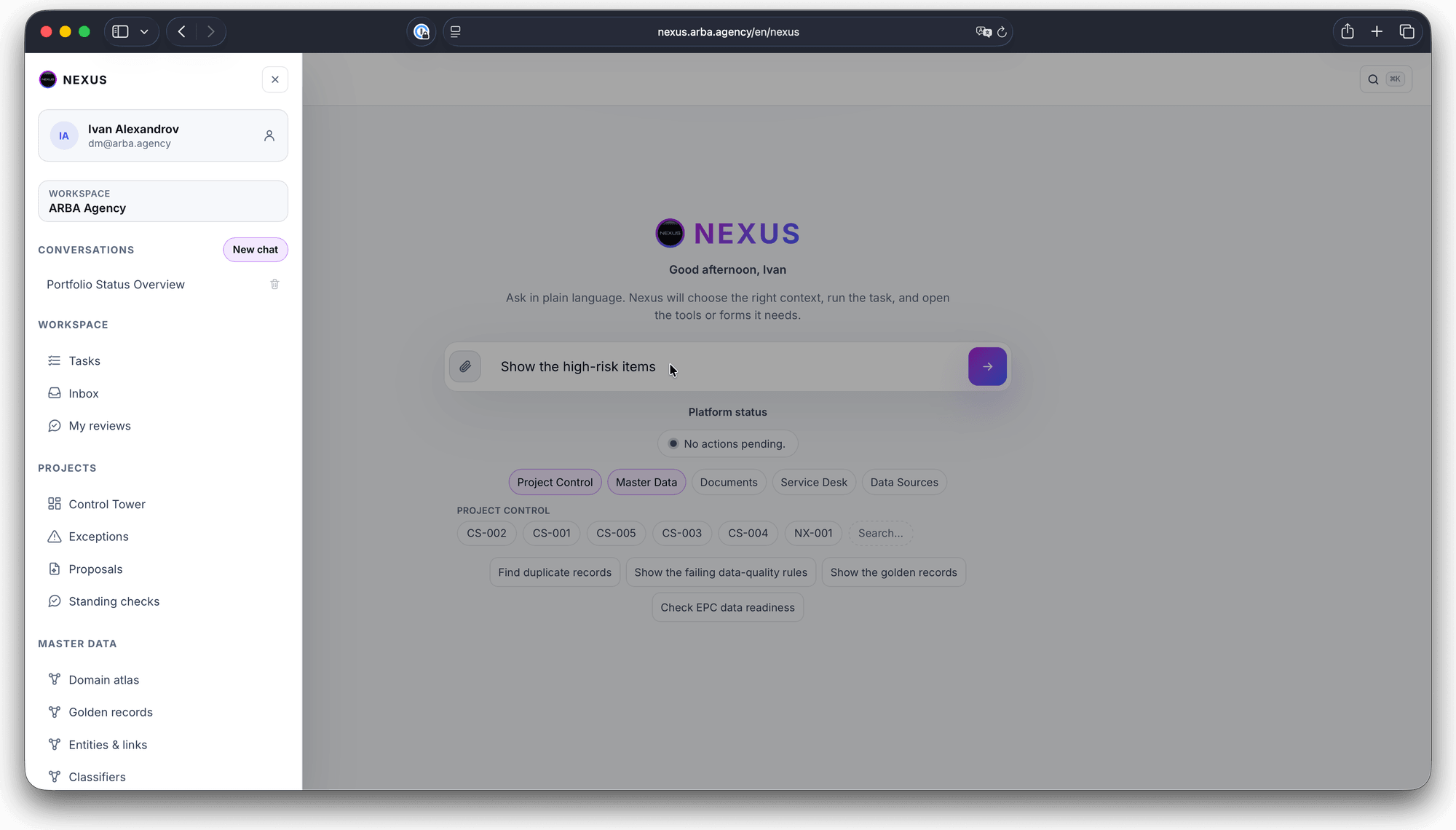
The task, conversation and tools stay together

The employee follows the task, discusses findings with AI and uses specialist tools in the same console. Ongoing work and decisions awaiting a person remain accessible.

Nexus console with tasks, inbox, reviews and business domains — open full-size image
Open the screen at full size ↗
01

Your work

Tasks, inbox and reviews keep ongoing work and human decisions accessible.

02

Company context

Choose a domain or business object: master data, documents or project control.

03

Specialist tools

Move from a request into a catalogue, evidence view or duplicate-review screen when the task requires it.

Conversation, source inspection and specialist decisions are different parts of the same work.

Existing Nexus console capture from the original presentation; interface details may vary by release and configuration.
07 / 23
NEXUSHow it works

Company context is more than a search result

Employees and AI need the context behind a finding. Nexus connects sources to business objects and earlier findings, so a report can be understood alongside its project, version and prior decisions.

01

Map of the corpus

What information exists: collections, documents, owners and relationships between them.

02

Digests and observations

Summaries and findings help navigate a large body of material and identify gaps, contradictions or changes between versions.

03

Business relationships

Documents relate to projects, materials, counterparties and responsible people rather than remaining isolated files.

04

History

For supported objects, distinguish when a fact applied from when it was recorded. Preserve the basis of earlier decisions.

The expert sees the relevant information, its relationships and its provenance — within their access rights.

08 / 23
NEXUSBusiness tasks

Putting data in order is part of the work

Employees and AI encounter the same data problems: conflicting names, mixed units, duplicate codes and missing attributes. Nexus includes the tools to put this information in order as part of solving the business task.

01

Start with a business difficulty

An item cannot be found, a supplier appears under several names or reports disagree. Select the domain needed to resolve that difficulty.

02

Let Nexus prepare the analysis

Profile the records, propose normalisation and matching rules, and assemble candidates with an explanation of agreements and conflicts.

03

Keep decisions with the owner

Specialists review the prepared work. Accepted rules and resolved identities form a foundation that subsequent tasks can reuse.

Begin with a bounded domain. Build data quality into its continuing operation.

09 / 23
NEXUSBusiness tasks

From a document to information the company can use

To compare a proposal or investigate a project, employees and AI need usable documents. The document store combines recognition, classification, metadata and retrieval, keeping the work linked to its sources.

01

Recognise

Extract text from documents and scans, including Russian, Kazakh and English material.

02

Classify and enrich

Identify the document type and propose attributes. Review extracted information where required.

03

Connect

Relate the document to its counterparty, asset or project and preserve its source version.

04

Retrieve and use

Find relevant passages with source references, then compare documents or prepare an evidence-backed deliverable.

Recognised document + metadata + business links + cited passages

Less manual document preparation; a clearer route from a finding back to its source.

10 / 23
NEXUSBusiness tasks

A corporate document remains a governed record

Search is only one part of a document’s life. Records management also determines who can read it, which version was used and how long it must be kept.

Access and retrieval

Retrieval follows the reader’s permitted scope. A useful match does not create a right to open a document.

Versions and references

Keep the source version behind a finding so an expert can check the document that supported it.

Retention and legal holds

Retention rules govern the lifecycle. A hold prevents disposal while the relevant restriction remains in force.

Read history

Document access can be examined as well as changes: who opened the material and when.

The same corpus supports daily work, investigation and accountability.

11 / 23
NEXUSBusiness tasks

Project control: connect reported progress to evidence

The owner needs to understand what supports a reported status. Nexus compares reports, completion criteria and available documents, then makes the discrepancies reviewable.

The report

Reported position

A contractor reports that an equipment milestone is complete.

Milestone reported complete
The evidence check

Supporting material

The delivery note is available. The acceptance record required by the milestone criteria has not been found in the reviewed material.

Delivery note: found · acceptance record: not found

Exception for the owner

Identify the missing evidence, link the reviewed sources and route the question to the responsible person before the next decision.

Finding → sources → responsible person → review

Management gets a queue of specific discrepancies with evidence and ownership.

Illustrative scenario. Missing evidence calls for clarification; it does not prove that physical work is incomplete.
12 / 23
NEXUSBusiness tasks

From a source extract to a golden record

Nexus prepares the difficult comparison work. The data owner decides which records represent the same thing and which values should form the shared record.

01

Source and profile

Fix the source version. Assess completeness, formats, units and anomalies before proposing changes.

02

Rules and candidates

Normalise descriptions and compare identifiers and attributes. Explain matches, differences and missing evidence.

03

Review and merge

The owner confirms or rejects. Survivorship rules select field values with their provenance; the merge remains reversible.

04

Publish and monitor

Distribute approved master data to agreed consumers and track divergence. Source-system changes follow the configured approval process.

Approved identity + source links + field provenance

A golden record is a governed identity with traceable values and links to its source records.

14 / 23
NEXUSBusiness tasks

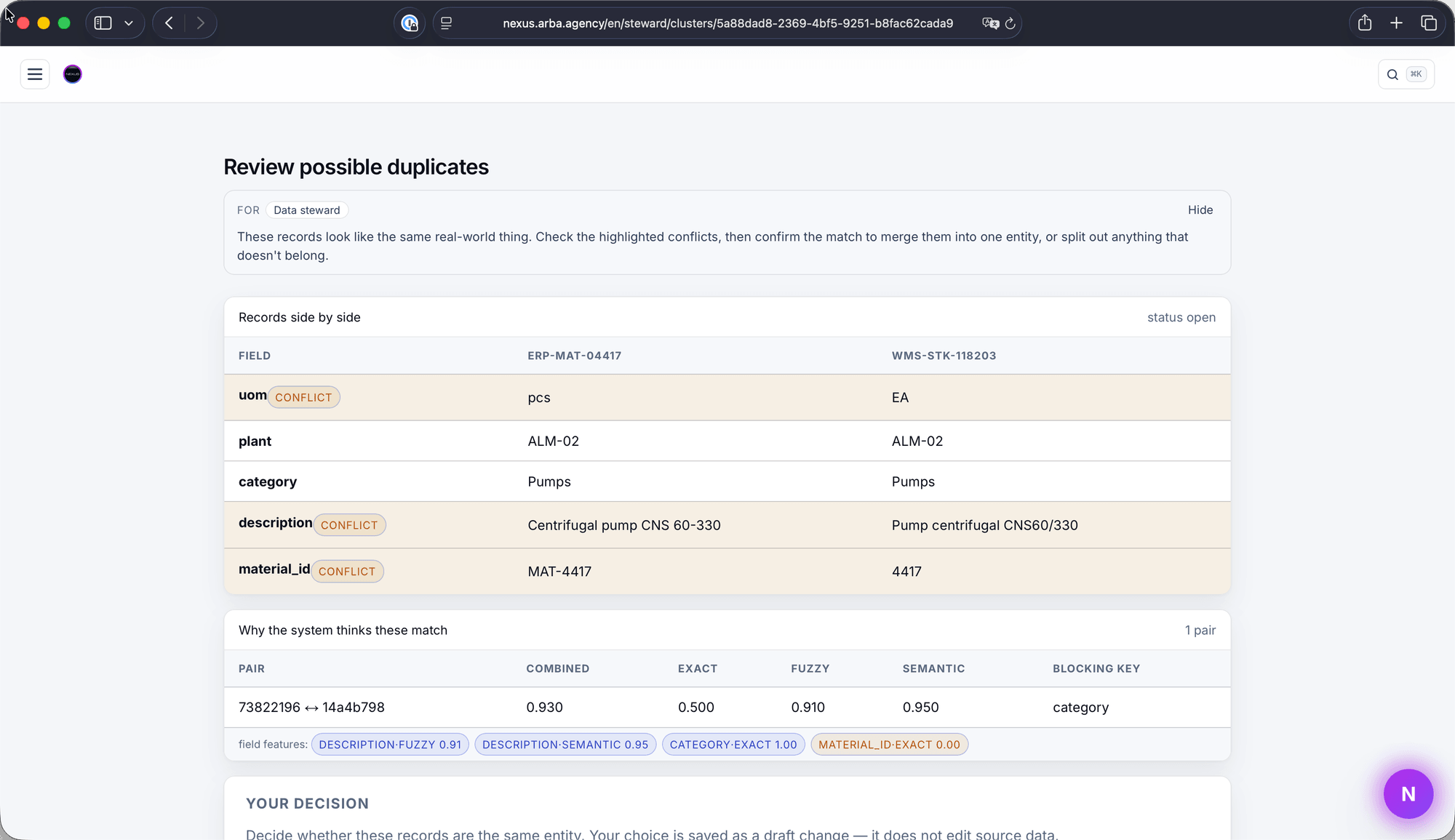
A specialist sees why records may be the same item

Duplicate review puts source records side by side, highlights conflicting attributes and explains the matching signals before the owner decides.

Nexus duplicate-review screen: source attributes, conflicts and matching signals — open full-size image
Open the screen at full size ↗
01

Compare the evidence

Identifiers, descriptions, units and classification remain visible. A similar description alone is not proof of identity.

02

Inspect the reasoning

Exact, fuzzy and semantic matching provide different signals. Conflicts help the reviewer identify a variant or an incorrect candidate.

03

Record the decision

Confirm, reject or split the group. The decision creates a governed draft change and retains its source evidence.

Human effort moves from searching through rows to deciding on prepared, explained candidates.

Existing Nexus review-screen capture from the original presentation; displayed records illustrate the review interface.
15 / 23
NEXUSBusiness tasks

A domain lives on after the first cleanup

A material catalogue depends on classifications, units, manufacturers and supplier references. Sustained quality means managing those relationships as the business changes.

Quality under observation

Profiling and validation surface anomalies and failed rules as an explained queue of work. Proposed corrections remain reviewable.

Hierarchies and reorganisations

Groups and roll-ups retain their history when relationships change. An organisational move need not erase the earlier structure.

Memory over time

For supported objects, separate when a fact was valid from when the company learned it. Corrections add knowledge without silently rewriting the past.

Publication and divergence

Keep the approved master record connected to consuming systems and identify where source and master data disagree.

Accepted corrections improve the shared data that employees and AI will use in subsequent tasks.

16 / 23
NEXUSEnterprise operation

One work environment for different business teams

A warehouse integration can serve procurement, maintenance and project control. Further tasks reuse the source and its tools, with permissions and workflow configured for each use.

Connected source

Warehouse

Stock records and permitted queries

Nexus

Shared tools and execution controls

Procurement

Check stock and open requests before preparing a purchase.

Maintenance

Find the materials available for a planned or urgent repair.

Project control

Compare material availability with the needs of planned work.

Teams reuse connected sources and tools; each task retains its own permissions and decision rules.

17 / 23
NEXUSEnterprise operation

AI does the work. The company stays in control.

Working together with AI requires clear responsibilities: who requested the work, what AI may do and where a person must decide. Nexus keeps permissions, evidence and the execution history attached to the task.

On the user’s behalf

Check the initiating user’s authority before reading sources and taking action. Replanning does not grant additional access.

Human checkpoints

Material actions that require approval stop for an authorised decision. Preparing a change and applying it are separate operations.

Evidence behind findings

Sources, records and versions support the result. Missing or conflicting evidence remains visible to the specialist.

A trace of the work

Connect the request, tools, findings, approvals and operation results. Investigate execution and errors through that history.

The company can inspect both the basis of a conclusion and the authority behind an action.

18 / 23
NEXUSEnterprise operation

Your infrastructure. Your choice of supported models.

Where Nexus runs and where inference runs are separate architecture decisions. The design follows corporate access policies, data-sharing rules and approved service endpoints.

The Nexus installation

Deploy in corporate infrastructure or an agreed Azure environment. Define ownership of storage, networking, identity, updates and recovery.

Corporate infrastructureAzure

Model services

Use supported OpenAI or Azure Foundry connections through company-approved endpoints. Configure model choice and access for the work.

OpenAIAzure Foundry

Data boundaries

Document which information remains inside the installation and which model calls may leave it. Enforce approved inference destinations and egress rules.

Infrastructure choice and model choice remain distinct; the enterprise approves their connection.

Additional AWS deployment, Bedrock and local-model configurations are development directions. Full isolation requires a supported end-to-end configuration.
19 / 23
NEXUSEnterprise operation

Evaluate the work delivered and control the cost

Evaluate how employees and AI complete the task: the quality of the result, expert effort, review and rework. Nexus supplies model usage and execution-cost estimates for this assessment.

01

Account for the work

Attribute model calls and estimated cost to the task and its execution context. Review expenditure for a concrete process rather than one undifferentiated AI bill.

02

Set spending boundaries

Configured usage limits bound consumption. The company defines the budget policy under which agents may continue work.

03

Choose the model for the job

Use the supported model appropriate to the task: routine processing and demanding analysis can have different quality, speed and cost requirements.

Evaluate business value alongside these controls: expert time, review, rework and cost per accepted result.

Execution estimates are reconciled with provider terms. Total ownership cost also includes implementation, infrastructure and support.
20 / 23
NEXUSEnterprise operation

New tasks, the same work environment

As teams bring further tasks into Nexus, they can reuse connected data and tools. Each scenario defines its result, permitted operations and decision points within the same work environment.

Common product foundation

Tasks and Agentic Runtime, data tools, execution history and action controls provide the core mechanisms.

Company-specific implementation

Sources, integration operations, SSO, Teams channels and access rules connect those mechanisms to the company’s work.

Studio — in development

The intended workflow lets specialists describe and extend task scenarios, with review before activation. Scenario authoring does not create new authority.

Agent-to-agent — in development

A2A is intended to support interaction with agents in other enterprise systems, including ERP, through defined interfaces and permissions.

Develop a company library of capabilities around shared data, tools and execution controls.

21 / 23
NEXUSGetting started

Start with one business task and a concrete result

Select work that is difficult because information is fragmented: a material domain, a document review or a project-assurance question. Agree the baseline and acceptance criteria first.

Input

Your company brings

A task owner, subject-matter experts, representative material and agreed access. Describe the current process, its effort and the constraints.

Working phase

We configure and test together

Connect sources and prepare the rules and tools. Your specialists work through the task with AI, review the findings and record gaps, effort and integration behaviour.

Deliverable

Your team receives

A work product and its evidence, reviewed findings, a record of decisions and an assessment against the agreed quality and effort measures.

The first evaluation tests a way of working: a real team, its task, the result and the conditions for continued use.

22 / 23
NEXUSGetting started

Start with your team. Bring a real task.

Show us how your team works today: where it gathers information, reconciles records and makes decisions. Together, we will identify the work AI can take on and the decisions that stay with employees.

01

The business result

What should the employee or manager be able to complete?

02

The company environment

Which sources, systems and access boundaries are involved?

03

The first evaluation

What would demonstrate useful, reliable work on your material?

Discuss Nexus for your business

Nexus · Where employees and AI work on business tasks together

23 / 23
Nexus — A next-generation work environment